Foundation Software vs QuickBooks Online for Construction Bookkeeping
If you're a bookkeeper deciding between Foundation Software and QuickBooks Online for your construction contractor clients, this is the comparison you need. We cover WIP reports, job costing, retainage, pricing, and who each tool is actually built for.
The Short Answer
Foundation Software
Built specifically for construction. Has native WIP reports, certified payroll, AIA billing, and union tracking. Best for larger GCs doing $5M+ in annual revenue who need a full ERP.
QuickBooks Online
General-purpose accounting that most small contractors already use. No native WIP report, but much cheaper, easier to adopt, and integrates with more tools. Best for contractors under $5M.
What Foundation Software Does Well
Foundation is purpose-built for construction accounting. It has features that QuickBooks simply doesn't have out of the box:
- Native WIP reporting — Foundation generates a WIP schedule automatically. No Excel, no manual calculations. It tracks earned revenue, over/under billings, and retainage natively.
- Certified payroll — Prevailing wage, union rules, and government-required reporting are built in. This is critical for GCs doing public works jobs.
- AIA billing (G702/G703) — Foundation can produce AIA pay applications directly from job data.
- Equipment costing — Track equipment costs by job, including depreciation and usage rates.
- Job cost forecasting — Built-in tools to project final job costs and compare to budget.
- Subcontractor compliance tracking — Insurance certificates, lien waivers, 1099 tracking.
Where Foundation Falls Short
Foundation's strengths come with real trade-offs that matter a lot for bookkeepers:
- Price — Foundation typically costs $5,000–$15,000+ per year depending on modules and users. QBO Plus is ~$1,188/year. The gap is significant for small contractors.
- Implementation cost — Setting up Foundation correctly takes time and often requires a consultant. QBO a bookkeeper can get running in a day.
- Learning curve — Foundation is complex. Contractors who aren't tech-savvy will struggle. You'll spend more time training and supporting them.
- Contractor adoption — Most small contractors already have QBO. Migrating them to Foundation is a major change management challenge.
- App ecosystem — QBO integrates with hundreds of apps (payroll, CRM, field tools). Foundation's integrations are more limited.
- Cloud access — Foundation's cloud offering is newer and less mature than QBO's.
What QuickBooks Online Does Well for Construction
QBO isn't purpose-built for construction, but it's not helpless either:
- Job costing with Projects — QBO's Projects feature tracks income and costs by job, with a profitability dashboard. It's basic compared to Foundation, but good enough for many small contractors.
- Estimate-to-Invoice workflow — Create an Estimate → send to client → convert to progress invoices as work proceeds. Clean and familiar for most contractors.
- Subcontractor 1099 tracking — QBO handles this natively.
- Bank feeds and reconciliation — QBO's bank feed matching is excellent. Bookkeepers can reconcile fast.
- Price — At $99–$235/month, QBO is accessible for contractors at any size.
- Your client probably already uses it — This is not a small thing. Not having to migrate a client is a huge advantage.
The Biggest Problem with QuickBooks Online for Construction
Here's the honest truth: QBO does not have a WIP report.
WIP schedules are required by construction lenders, bonding companies, and CPAs. They show earned revenue vs. billed revenue on each active job — the core financial health indicator for any construction business. Without it, your client's financials are incomplete.
With Foundation, you run the WIP report in the software. With QBO, you have to build it in Excel every month by pulling Estimates, Job Profitability, and Invoice reports — then calculating cost-to-cost percentages, earned revenue, and over/under billings manually. For a bookkeeper with 5–10 QBO construction clients, this is 15–30 hours a month of spreadsheet work.
This is exactly what ReconcileBook solves. It connects to QuickBooks Online and generates the WIP schedule automatically — pulling the same data you'd pull manually, doing the math instantly, and letting you export a PDF in one click.
Head-to-Head Comparison
| Feature | Foundation | QBO | QBO + ReconcileBook |
|---|---|---|---|
| Native WIP report | ✓ | ✗ | ✓ |
| Job costing | ✓ | Basic | ✓ |
| Retainage tracking | ✓ | Manual | ✓ |
| AIA billing (G702/G703) | ✓ | Manual | ✗ |
| Certified payroll | ✓ | ✗ | ✗ |
| PDF WIP export | ✓ | ✗ | ✓ |
| Multi-client dashboard | — | ✗ | ✓ |
| Easy contractor adoption | ✗ | ✓ | ✓ |
| Price (per contractor) | $5k–$15k/yr | $1.2k/yr | $1.2k + $99/mo |
| Setup time | Weeks | Days | Days |
| App integrations | Limited | Hundreds | Hundreds |
Which Should You Recommend to Your Clients?
Recommend Foundation if:
- The contractor does $5M+ in annual revenue
- They do prevailing wage or union work
- They need certified payroll reporting
- They regularly produce AIA pay applications
- They have an office manager or controller who can learn new software
- They're willing to invest in a proper implementation
Recommend QBO (+ ReconcileBook) if:
- The contractor is under $5M in revenue
- They're already using QBO and don't want to migrate
- You manage multiple construction clients and need WIP at scale
- They need WIP and job costing reports but not certified payroll
- You want to stay in a familiar ecosystem with better integrations
- Budget is a consideration
What the QBO + ReconcileBook WIP Schedule Looks Like
This is what ReconcileBook generates automatically from QuickBooks Online — the same WIP schedule a bookkeeper would spend 2 hours building in Excel, ready in 30 seconds:
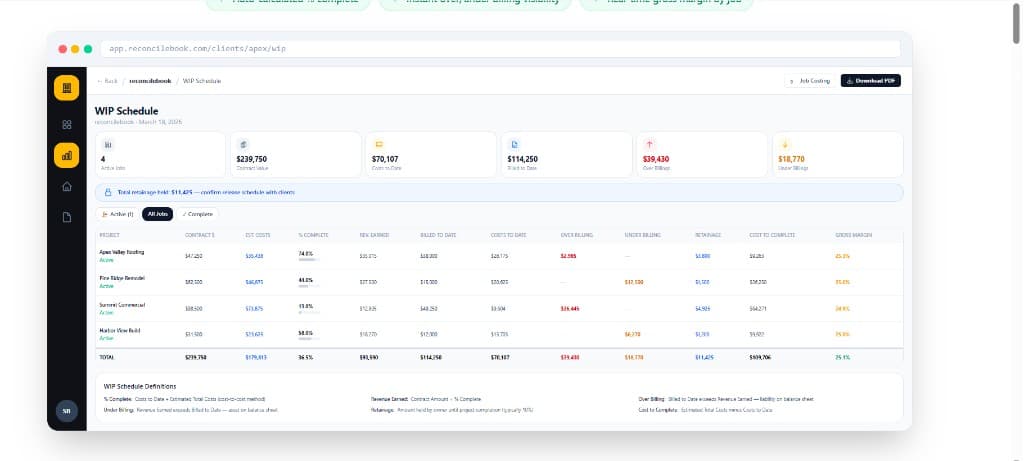
ReconcileBook WIP Schedule — live from QuickBooks Online. No Excel required.
The Bottom Line for Bookkeepers
For most construction bookkeepers building a practice around small-to-mid contractors, QuickBooks Online is the right platform. Your clients are already on it, it's affordable, and the ecosystem is unmatched.
The gap — WIP reports, job costing reports, retainage tracking — is real, but it's solvable without migrating your clients to a $10,000/year ERP. ReconcileBook fills exactly that gap: it adds construction-specific reporting on top of QBO, giving your clients what they need without rebuilding their entire accounting setup.
Keep your clients on QBO. Add the WIP reports they need.
ReconcileBook connects to QuickBooks Online and generates WIP schedules, job costing reports, and retainage tracking automatically.