Construction Accounting Software Compared: WIP Reports & Job Costing
QuickBooks Online, Sage 100 Contractor, Foundation Software, Procore, Buildertrend — every construction software handles WIP reports and job costing differently. Here's exactly what each does, what it can't do, and which is right for your clients.
Why This Comparison Matters for Bookkeepers
WIP reports and job costing are the two reports that separate construction bookkeeping from regular bookkeeping. If your client's software can't produce them accurately, you're building them manually in Excel — which costs you hours every month.
The problem is that every software handles these differently, and the marketing materials don't tell you the full story. "Job costing" in one tool means something completely different in another. Here's the honest breakdown.
QuickBooks Online
Best for: Small contractors under $5M | Price: $99–$235/month
WIP Reports
Verdict: No native WIP report. QBO does not calculate earned revenue, % complete, or over/under billings. To produce a WIP schedule, bookkeepers must export Estimates, Job Profitability, and Invoice reports to Excel and calculate everything manually. This takes 1–2 hours per client per month.
Job Costing
Verdict: Basic but usable. QBO's Projects feature tracks costs and income per job with a profitability dashboard. It shows total revenue, cost, and profit by job — but doesn't break costs into categories (labor vs. materials vs. subs), doesn't compare budget vs. actual, and doesn't do cost forecasting.
Retainage Tracking
Verdict: Manual. QBO has no native retainage field. Bookkeepers typically track it via line items on invoices or a separate receivable account. It works but requires discipline.
Bottom Line for Bookkeepers
QBO's biggest advantage is that your clients are almost certainly already on it. The construction-specific gap — WIP reports — can be filled with ReconcileBook, which connects to QBO and generates the WIP schedule automatically.
Sage 100 Contractor (formerly Sage Master Builder)
Best for: Mid-size GCs, $3M–$50M | Price: ~$3,000–$8,000/year
WIP Reports
Verdict: Native WIP report included. Sage 100 Contractor has a built-in WIP schedule that calculates earned revenue, over/under billings, and retainage per job. It uses the cost-to-cost method and ties directly into the general ledger.
Job Costing
Verdict: Strong. Sage 100 Contractor has dedicated job cost modules with budget vs. actual tracking, cost codes, cost categories (labor, material, sub, equipment, other), and committed cost tracking for purchase orders and subcontracts. This is real construction job costing.
Retainage Tracking
Verdict: Native. Retainage receivable and payable are tracked natively, with automatic balance sheet entries.
Bottom Line for Bookkeepers
Sage 100 Contractor is a legitimate construction accounting system. The trade-off is complexity and cost — it takes weeks to implement correctly, and contractors need training. It's the right call for established GCs who are outgrowing QBO.
Foundation Software
Best for: GCs doing $5M–$100M+ | Price: ~$5,000–$15,000+/year
WIP Reports
Verdict: Best in class. Foundation generates WIP schedules natively with multiple methods (cost-to-cost, units complete, milestones). It tracks over/under billings, retainage, and projected final costs in real time.
Job Costing
Verdict: Best in class. Full cost code structure, budget vs. actual, committed costs, labor burden, equipment rates, and forecasting. It's what construction accountants reach for when they need real numbers.
Other Strengths
Foundation also handles certified payroll, union reporting, AIA billing, subcontractor compliance, and equipment costing — features that larger GCs actually need.
Bottom Line for Bookkeepers
Foundation is the right answer for larger contractors — but the implementation and pricing put it out of reach for most small contractors. If your client is under $5M and already on QBO, Foundation is overkill.
Procore
Best for: Project management-first GCs | Price: ~$375–$1,000+/month per project
WIP Reports
Verdict: Exists, but not accounting-grade. Procore has a "WIP Report" feature, but it's designed for project managers — not CPAs or bonding companies. It doesn't produce a GAAP-compliant WIP schedule that ties to the general ledger. Most bookkeepers using Procore still need a separate accounting system.
Job Costing
Verdict: Good for tracking, limited for accounting. Procore's budget and cost tracking tools are excellent for project managers — commitment tracking, change order management, budget snapshots. But Procore is not an accounting system. It needs to sync to QBO, Sage, or Foundation for real financial reporting.
Bottom Line for Bookkeepers
Procore is a project management tool, not an accounting system. Your clients may love it for field operations, RFIs, and submittals — but you still need an accounting system behind it. Most Procore users sync to QBO or Sage for the financial side.
Buildertrend
Best for: Residential remodelers and custom home builders | Price: ~$199–$699/month
WIP Reports
Verdict: No native WIP report. Buildertrend is built for residential contractors — scheduling, client communication, change orders, selections. It doesn't produce a WIP schedule. Most Buildertrend users still do their WIP in Excel or QBO.
Job Costing
Verdict: Basic budget tracking. Buildertrend has budget tracking by job, but it's not accounting-grade job costing. It integrates with QBO to pull in transactions, but the reporting is limited.
Bottom Line for Bookkeepers
Buildertrend clients will almost always have QBO running alongside it. The WIP report still needs to be built separately.
The Full Comparison Table
| Feature | QBO | QBO + ReconcileBook | Sage 100 | Foundation | Procore |
|---|---|---|---|---|---|
| WIP schedule (GAAP) | ✗ | ✓ | ✓ | ✓ | Partial |
| Job costing (budget vs actual) | Basic | ✓ | ✓ | ✓ | Partial |
| Cost categories (labor/mat/sub) | ✗ | ✓ | ✓ | ✓ | ✓ |
| Retainage tracking | Manual | ✓ | ✓ | ✓ | ✗ |
| AIA billing | ✗ | ✗ | ✓ | ✓ | ✗ |
| Certified payroll | ✗ | ✗ | ✓ | ✓ | ✗ |
| PDF WIP export | ✗ | ✓ | ✓ | ✓ | ✗ |
| Multi-client dashboard | ✗ | ✓ | ✗ | ✗ | ✗ |
| Easy adoption | ✓ | ✓ | Medium | Hard | Medium |
| Annual price (typical) | $1.2k | $1.2k + $1.2k | $4k–$8k | $7k–$15k | $4k–$12k+ |
The Recommendation by Contractor Size
Under $2M annual revenue
QBO + ReconcileBook. They're already on QBO (or should be). Don't recommend anything that costs more than their bookkeeping bill.
$2M – $5M annual revenue
QBO + ReconcileBook. Still the right call for most. If they're doing prevailing wage, evaluate Sage 100.
$5M – $20M annual revenue
Sage 100 Contractor or Foundation. At this size, certified payroll, union, and AIA billing become real needs. The investment is justified.
$20M+ annual revenue
Foundation, Sage 300 CRE, or Vista by Viewpoint. Enterprise construction accounting with full ERP capabilities.
What the Manual Excel WIP Looks Like vs. the Automated Version
Here's the reality for most bookkeepers on QBO today — a spreadsheet rebuilt every month by hand:
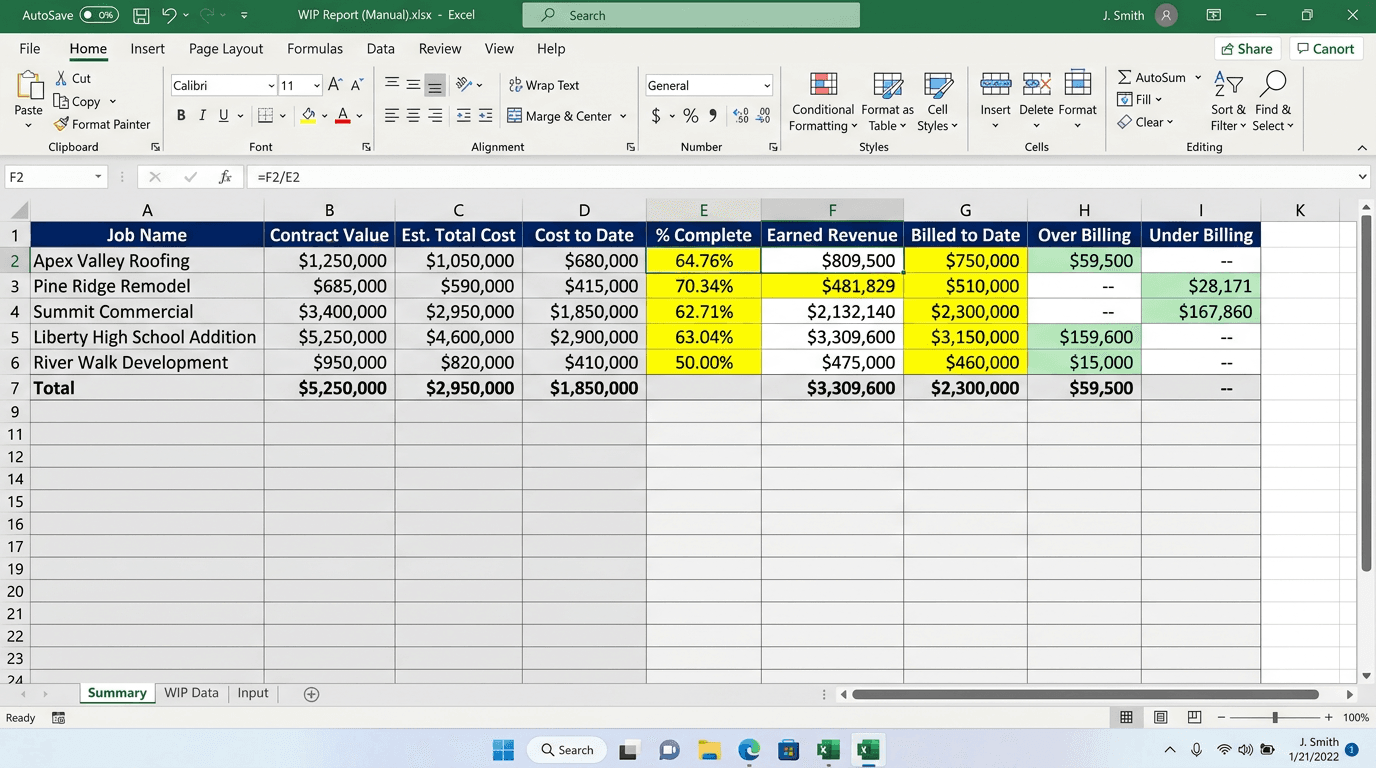
The manual QBO → Excel WIP workflow. ~2 hours per client per month.
And here's what ReconcileBook generates automatically from the same QBO data:
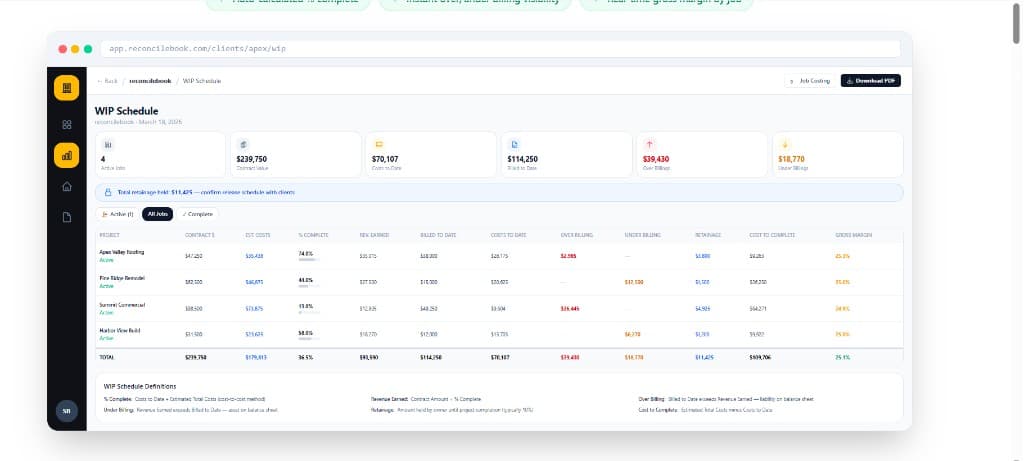
ReconcileBook WIP Schedule — generated in 30 seconds from QuickBooks Online.
Why Most Bookkeepers Stay with QBO + a WIP Tool
Migrating a contractor off QuickBooks Online is a major project. You lose all their history, you retrain the contractor and their staff, you spend weeks on implementation — and you take on the risk if anything goes wrong.
For bookkeepers running a practice around 5–20 construction clients, the math is simple: keep clients on QBO (where you're efficient and comfortable), and add the construction-specific reporting layer on top.
ReconcileBook is built for exactly this: it connects to QuickBooks Online and generates the WIP schedule and job costing reports that construction bookkeepers need — automatically, every month, for every client.
Keep your clients on QBO. Get construction-grade WIP reports automatically.
Connect QuickBooks Online → WIP schedule generates in 30 seconds. Job costing, retainage, PDF export — included.